
Website Optimization
Why Your Small Business Website Isn't Getting Leads (And How to Fix It)
10 Reasons Your Small Business Website Isn't Getting Leads and How to Fix Them to Attract More Customers.

Written byShykat Roy
- Published:
- Reading time
- 9 min read
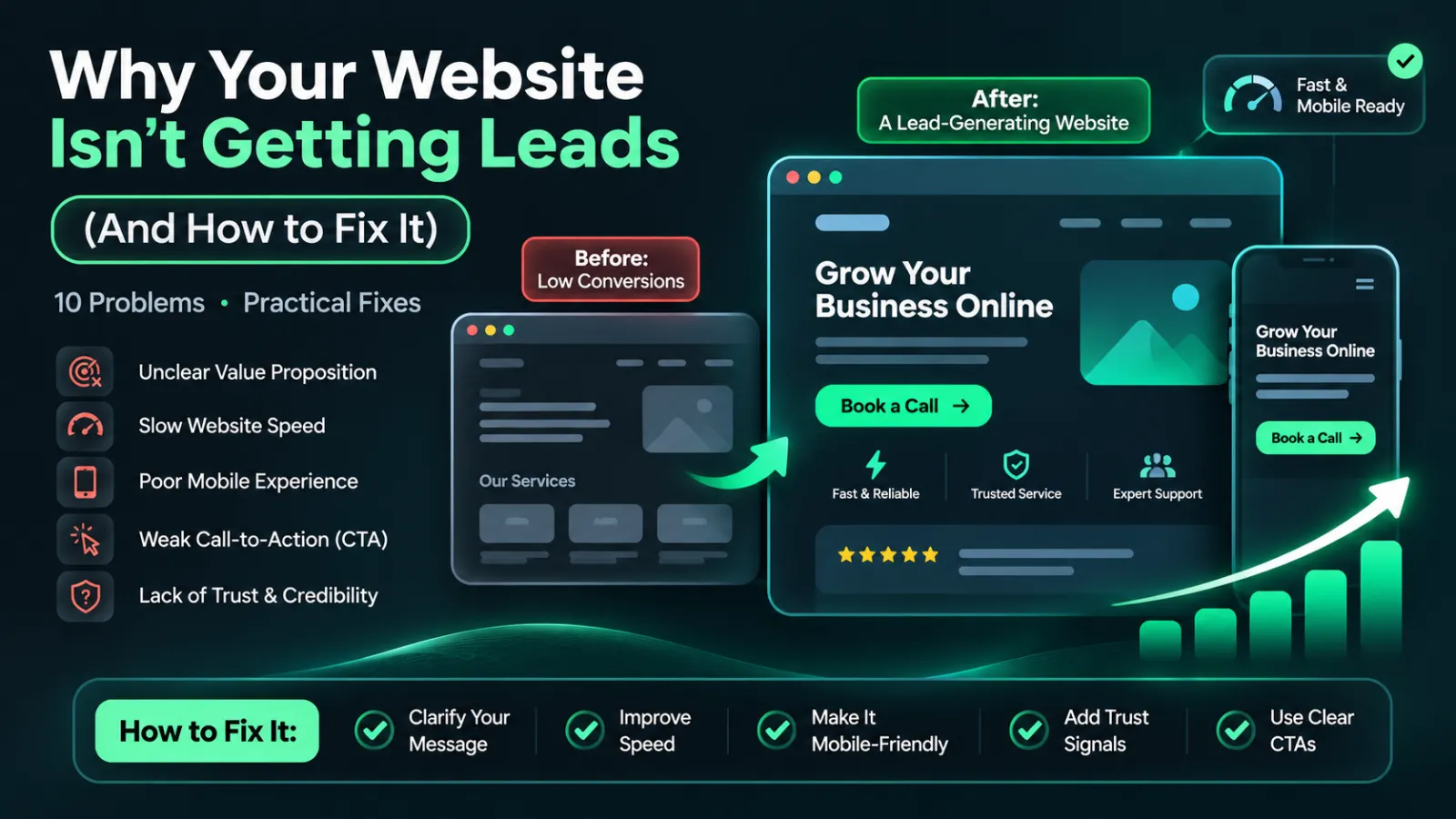
Why Your Small Business Website Isn't Getting Leads (And How to Fix It)
You invested in a website for your business. It looks professional, has your logo, explains your services, and includes a contact page. But there's one frustrating problem: your website isn't bringing in customers.
Maybe people visit but never contact you. Maybe your enquiry form stays empty for weeks. Or perhaps you're getting traffic, but most visitors leave without taking action.
This is a common challenge for small-business owners. A website can look impressive without doing a good job of turning visitors into potential customers.
The good news? You don't necessarily need to rebuild your entire website. Sometimes, improving a few important elements can make a meaningful difference.
Let's examine what's going wrong and how to fix it.
Quick answer: If your small-business website isn't getting leads, the problem may be low-quality traffic, unclear messaging, slow loading, weak calls to action, missing trust signals, or complicated contact forms. Start by checking traffic and conversion tracking, then improve your messaging, mobile experience, and enquiry process. Measure results before investing in a complete redesign.
First, Understand Why Your Website Isn't Converting
Before changing your website, you need to identify the actual problem.
There are two different situations:
Situation 1: Your website isn't getting visitors.
This is primarily a traffic-generation problem. You may need better SEO, relevant content, local search visibility, or more effective marketing.
Situation 2: Your website gets visitors, but nobody contacts you.
This is more likely a conversion problem. People are arriving, but something is stopping them from enquiring.
For example, imagine your website receives 500 visits in a month and generates only two enquiries.
That doesn't automatically mean your website is broken. The traffic might not match your services, or visitors might be researching rather than preparing to buy.
The first step is understanding visitor intent rather than assuming every visitor should become a lead.
10 Reasons Your Small Business Website Isn't Getting Leads
1. Your Homepage Doesn't Explain What You Actually Do
Imagine visiting a website and seeing this headline:
"We Deliver Innovative Digital Solutions."
It sounds professional, but what does the business actually offer?
Visitors shouldn't have to guess.
Your homepage should quickly answer three questions:
- What do you offer?
- Who is it for?
- What should visitors do next?
How to fix it:
Replace vague marketing statements with specific, benefit-focused messaging.
Instead of "Innovative Digital Solutions," try:
"Custom Websites for Small Businesses That Need More Customer Enquiries."
Support that headline with a short explanation and a clear next step.
Visitors are more likely to continue exploring when they understand how your business can help them.
2. Your Website Doesn't Have a Clear Call to Action
A call to action (CTA) tells visitors what to do next.
Without clear CTAs, potential customers may read your content and leave without contacting you.
Common CTA examples include:
- Get a Free Quote
- Book a Consultation
- Request a Callback
- Discuss Your Project
How to fix it:
Choose one primary CTA for each important page.
For a service-based website, "Get a Free Quote" might be more useful than a generic "Learn More" button.
Place your main CTA near the top, after important service explanations, and toward the bottom of the page.
Don't overwhelm visitors with too many competing choices.
3. Your Website Loads Too Slowly
Website speed affects the experience people have with your business.
If visitors must wait for images, animations, or complicated scripts to load, they may lose interest before reaching your contact form.
Google's Core Web Vitals provide useful measurements of loading performance, responsiveness, and visual stability.
A good Largest Contentful Paint (LCP) target is 2.5 seconds or less.
How to fix it:
- Compress oversized images.
- Remove unnecessary scripts and plugins.
- Use efficient image formats.
- Optimize hosting and server response times.
- Avoid heavy animations that delay important content.
Focus on making your pages reliably usable, not just chasing a perfect performance score.
4. Your Website Doesn't Work Well on Mobile
Many potential customers first discover businesses through their phones.
A website that looks great on a desktop may be difficult to use on a smaller screen.
Common problems include tiny buttons, unreadable text, broken layouts, and forms that require excessive scrolling.
How to fix it:
Test your website on an actual mobile device.
Check whether customers can read your headline, find your services, tap the enquiry button, and complete a contact form comfortably.
Pay special attention to navigation menus and button spacing.
Your mobile experience should make enquiries easier, not create extra work.
5. Your Contact Form Is Too Complicated
Imagine a visitor wants to ask about your services, but your contact form requires twelve fields.
They may decide it isn't worth the effort.
For an initial enquiry, businesses rarely need every detail about the customer.
How to fix it:
Start with only essential information:
- Name
- Email or phone number
- A short message about the enquiry
Add other fields only when they help you provide a useful response.
Make error messages clear, validate important fields, and display a confirmation after successful submission.
Most importantly, test that enquiries actually reach your inbox or CRM.
A broken form can lose leads even when the website looks perfect.
6. Visitors Don't Trust Your Business Yet
Before contacting an unfamiliar business, people often look for evidence that it is legitimate and capable of delivering the promised service.
A website without credible information can make visitors hesitate.
Trust is particularly important when customers are considering expensive or long-term services.
How to fix it:
Include authentic trust signals such as:
- Real customer testimonials.
- Completed projects and case studies.
- Clear business contact information.
- Professional experience and relevant qualifications.
- Transparent explanations of your working process.
Avoid fabricated reviews or exaggerated claims.
Specific, verifiable examples are more persuasive than generic promises.
7. Your Service Pages Are Too Generic
Many small-business websites describe their services using only a few sentences.
For example:
"We provide high-quality website development services."
That doesn't explain what customers receive, how the process works, or whether the service suits their needs.
How to fix it:
Create informative service pages that address real buying questions.
Explain what's included, who the service is for, how projects are delivered, and what factors influence pricing.
If you cannot publish fixed prices, consider explaining typical project requirements or offering a clear quotation process.
Useful details help potential customers decide whether to enquire.
8. You're Attracting the Wrong Website Visitors
More traffic doesn't always mean more customers.
A website might attract visitors looking for free tutorials while the business primarily sells professional services.
Those visitors may find the content useful without needing to hire anyone.
How to fix it:
Build content around the actual problems your target customers want to solve.
For example, a web developer targeting small businesses could publish articles about website maintenance costs, online booking systems, and common website conversion problems.
These subjects may attract readers who are closer to making a business decision.
Connect relevant blog articles to your service pages through helpful internal links.
9. Your Website Makes It Difficult to Contact You
Some websites hide important contact information behind several navigation steps.
Others offer only one communication method, even when customers prefer a quick phone call or message.
Every unnecessary step creates another opportunity for visitors to abandon an enquiry.
How to fix it:
Make contact options easy to find.
Depending on your business, you could provide a contact form, phone number, email address, or consultation booking option.
Clearly explain what happens after someone contacts you.
For example:
"Tell us about your project, and we'll review your requirements before discussing the next steps."
Only promise a response time if your business can consistently meet it.
10. You're Not Tracking Leads Correctly
This is one of the most overlooked website problems.
If you only monitor page views, you may know how many people visited but not whether they contacted your business.
Without reliable measurement, it's difficult to identify which pages generate enquiries.
How to fix it:
Configure website analytics to track meaningful actions, such as successful enquiry submissions, booking confirmations, and relevant contact interactions.
Google Analytics 4 supports lead-generation events such as generate_lead.
For forms, trigger lead events after successful submission rather than simply when someone clicks the submit button.
Also track lead quality and whether enquiries turn into paying customers.
The goal is to understand which website improvements contribute to actual business outcomes.
How to Check Whether Your Website Is Generating Enough Leads
Once tracking works, start with a simple conversion measurement.
Website lead conversion rate = (Leads ÷ Relevant website sessions) × 100
For example:
| Metric | Example |
|---|---|
| Website sessions | 1,000 |
| Enquiries generated | 20 |
| Session-to-lead conversion rate | 2% |
This is an illustrative calculation, not an industry benchmark.
There is no universal conversion rate that every small business should achieve.
Results depend on your industry, traffic sources, services, pricing, and customer buying journey.
It is also important to distinguish between enquiries and qualified leads.
Twenty enquiries from people who cannot afford your service may be less valuable than five enquiries from suitable customers.
Monitor both conversion volume and lead quality.
A Practical Website Improvement Plan for Small Businesses
You don't have to change everything at once.
Start with a focused improvement plan.
Week 1: Diagnose the problem
Check website traffic, top landing pages, contact-form functionality, mobile usability, and existing conversion tracking.
Week 2: Improve the customer journey
Rewrite unclear headlines, strengthen service descriptions, simplify contact forms, and add relevant CTAs.
Week 3: Improve technical performance
Address significant loading problems, mobile layout issues, and unnecessary scripts.
Week 4: Measure the results
Compare relevant traffic, successful enquiries, and lead quality against your starting measurements.
Avoid making major changes to everything simultaneously if you want to understand which improvements helped.
A structured approach makes it easier to prioritize your website investment.
Do You Need a Website Redesign to Get More Leads?
Not always.
If your website already attracts relevant visitors and works technically, improving the content, enquiry process, and calls to action may be enough.
However, a more substantial redesign might be appropriate when the website has persistent mobile usability problems, outdated architecture, inaccessible navigation, or difficult-to-maintain functionality.
The decision should depend on the problems you identify, not simply on how old the website looks.
A successful business website should support customers from their first visit through to their initial enquiry.
Final Thoughts: Your Website Should Help Grow Your Business
A small-business website should do more than display your logo and services.
It should communicate value, establish trust, answer customer questions, and make contacting your business straightforward.
If your website isn't getting leads, start by separating traffic problems from conversion problems.
Then improve the elements that directly affect the customer journey.
A thoughtful combination of clear messaging, efficient design, technical performance, and conversion tracking can create a stronger foundation for long-term growth.
Need a website that makes it easier for potential customers to contact your business?
Shykat Roy offers custom web development services focused on fast, user-friendly websites, clear customer journeys, and practical business functionality.
Topics
- Small-business owners
- entrepreneurs
- service providers
Frequently asked questions
Why is my small business website getting traffic but no leads?
Your visitors may not be interested in your services, or your website may have unclear messaging, weak calls to action, missing trust signals, or a complicated enquiry process. Review visitor intent and check whether contact forms work before changing your website design.
How can I increase website leads without spending money on advertising?
Improve your service descriptions, create useful search-focused content, simplify contact forms, strengthen internal linking, and make calls to action more visible. These changes can help you make better use of existing organic traffic without relying entirely on paid advertising.
What is a good website conversion rate for a small business?
There is no single conversion rate that applies to every business. Your results depend on industry, audience, traffic quality, service pricing, and the definition of a lead. Measure your current performance and work toward improving qualified enquiries rather than following a generic benchmark.
Does website speed affect lead generation?
Website speed can influence user experience and whether visitors remain long enough to explore your services. Slow-loading pages may create unnecessary friction, particularly on mobile devices. Improving loading performance can make your website easier to use, although faster pages do not automatically guarantee more leads.
Should I redesign my website if it isn't generating enquiries?
Not necessarily. Start with an audit of your traffic, content, contact forms, user experience, and conversion tracking. If the main problems can be fixed through targeted improvements, a complete redesign may be unnecessary. Consider rebuilding only when existing technical or structural limitations prevent meaningful improvements.
Keep reading
All articles Web Development
WordPress vs Custom Website: Which Is Better for Your Business?
WordPress vs custom website: compare costs, speed, SEO, security, and flexibility to find the right website solution for your business.
7 min read
 Web Development
How I Build Fast, SEO-Friendly Websites with Next.js
Discover how I build fast, SEO-friendly Next.js websites using smart rendering, optimized images, structured data, and real portfolio examples.
12 min read